複数ID保持者のトラブル/Troubles with Multiple HIRODAI-IDs
私は複数の広大IDを持っています。広島大学の職員として勤務していますが、同時に広島大学の大学院で学んでおります。職員の広大IDと学生の広大IDの2つ広大IDを持っています。今回インシデント対応訓練は職員の広大IDでシステムにログインして行いましたが、学生の広大IDでも再度訓練を行う必要がありますか?
I have multiple HIRODAI-IDs. I work as a staff member at Hiroshima University and also study in the graduate school. So, I have two HIRODAI-IDs: one for my staff number and one for my student number. I logged into the system with my staff ID for the incident response drill. Do I need to log in again with my student ID to do the drill?
複数の広大IDをお持ちの場合は、いずれか一つの広大IDでシステムにログインし訓練を行って頂ければ大丈夫です。
持っている全ての広大IDで訓練を実施頂く必要はありません。
If you have multiple HIRODAI-IDs, you only need to log in with one of them to do the drill. You do not need to do the drill with all your IDs.
私は複数の広大IDを持っています。今回インシデント対応訓練は私が持っている複数の広大IDのうち、ある一つの広大IDでシステムにログインし訓練を行いました。訓練は完了しましたが、その後訓練が未実施で督促の連絡がありました。なぜ未実施の連絡があったのでしょうか?
I have multiple HIRODAI-IDs. I did the incident response drill by logging into the system with one of my IDs. I completed the training, but I received a message saying I haven't done the drill yet. Why did I get this message?
複数の広大IDを持っている場合、通常は「名寄せ」の処理が行われます。
「名寄せ」とは、複数の広大ID(職員番号、学生番号等)が同一人物に帰属することを管理する機能です。
複数の広大IDを持つ場合、通常は名寄せされているはずですが、登録漏れが発生する場合があります。
登録漏れが発生している場合は、持っている複数の広大IDのうち一つの広大IDで訓練を実施した場合であっても、未実施の連絡を行う場合があります。
登録漏れが発生している場合は、自らシステム上で「名寄せ追加」をすることできますので、以下のリンクから詳細と手順をご確認いただき「名寄せ追加」を行ってください。
※ なお、現在システムの不具合により、アカウントを持たない広大IDの名寄せができません。この場合個別にお問い合わせください。
When you have multiple HIRODAI-IDs, there is a process called "Name Identification Function." This process manages multiple HIRODAI-IDs (like staff number and student number) that belong to the same person. Usually, your IDs should be matched, but sometimes there can be a registration error. If there is an error, you might get a message saying you haven't done the drill, even if you did it with one of your IDs. You can fix this by adding the name matching yourself. Please check the details and steps from the following links:
※ Due to a current system issue, "Name Identification Function" cannot be performed for HIRODAI-IDs that do not have an account. In this case, please contact us individually.
言語のトラブル/Language Troubles
言語を英語にしたいのですが、どうすればよいでしょうか?
I would like to change my language to English.
moodleシステムの言語設定に従って教材を提供しています。
以下の手順で言語設定を変更してください。
- 画面の左上にある 「言語 / Language / 语言/」をクリックしてください。
- 「言語選択 / Select language / 选择语言 」ページで 「English」を選択し、保存します。
PDFが英語で表示されるようになります。
So please follow the steps below to change the language setting of yours.
- click on "言語 / Language / 语言/" in the upper left corner of the screen.
- select "English" on the "言語選択 / Select language / 选择语言" page and save it.
You will be able to view the PDF in English.
システムのトラブル/System Troubles
システム(Moodle)にログインしインシデント対応訓練を実施しようとしましたが、ログインできません。なぜでしょうか?
I tried to log into the system (Moodle) to do the incident response drill, but I couldn't log in. Why?.
以下を確認・試してみてください。
- 学外からログインする場合は「多要素認証」が必要です。「多要素認証」の設定が既に完了しているか、確認してみてください。
- ブラウザのキャッシュ情報を削除し、再度ログインを行ってください。
Please check and try the following:
- You need "multi-factor authentication" from off-campus to log in. Make sure you have set it up.
- Clear your browser's cache and try logging in again.
訓練内容のトラブル/Trouble with training content
事前教育のテキストに、自分が使用しているウイルス対策ソフトについて記載されていません。記載のあるウイルス対策ソフトを使用しなければならないですか?
The pre-education text does not mention the antivirus software I am using. Do I have to use the antivirus software mentioned in the text?
テキストには大学が提供するウイルス対策ソフト、またはMicrosoftが提供するウイルス対策ソフトを例示しています。必ずしもこれらを使用する必要はないので、ご自分で選択したウイルス対策ソフトを使用してください。
The text gives examples of antivirus software provided by the university or by Microsoft. You do not have to use these. You can use the antivirus software of your choice.
事前教育は受けなければならないのでしょうか?
Do I have to take the pre-education?
受けてください。
Yes, please take it.
インシデント対応訓練の案内がメールで届きました。このメールは本物でしょうか?
I received an email about the incident response drill. Is this email real?
いろは及びもみじへ掲示を行っていますので確認してください。また、メディアセンター利用登録システム(にアカウントでログイン後)のトップページにある個別ダイレクトメールからも確認可能です。
Please check the notices on Iroha or Momiji. You can also check the individual direct mail on the top page of the Media Center Registration System after logging in with your account.
案内のURLをクリックすると、他人のアカウント名が開きます。どうしたらいいですか?
When I click the URL in the notice, someone else's account name appears. What should I do?
別のブラウザを使用して、案内にあるURLをコピー&ペーストして開いて下さい。または、サインアウトして自身のアカウントでログインしてください。
Please use a different browser and copy and paste the URL from the notice. Or, sign out and log in with your own account.
自分は対象だと思うが、案内のメールが届きません。
I think I am supposed to receive the notice, but I did not get the email.
メールソフトの迷惑メールフォルダを確認して下さい。
Please check your email software's spam folder.
PCが複数台あるがどのPCについて回答すればよいでしょうか?
I have multiple PCs. Which one should I answer about?
主にお使いのPCについてご回答ください。
Please answer about the PC you mainly use.
訓練実施後のトラブル/Troubles After Drill
私はインシデント対応訓練を行いました。訓練が完了しているか確認する方法はありますか?
I completed the incident response drill, Is there any way to verify that the training has been completed?
以下の方法で完了を確認できます。
You can confirm completion using the following methods.
1. 完了通知メールの受信
対応訓練に回答すると、情報化推進グループ(機構)から「インシデント対応訓練完了のお知らせ」という件名のメールが自動送信されます。
このメールを受信していれば、訓練は完了しています。
※ 完了通知メールが迷惑メール等に振り分けられる場合があります。
※ 受信トレイに見当たらない場合は、迷惑メールフォルダなどもご確認ください。
1. Receiving the Completion Notification Email
After responding to the training, 情報化推進グループ(機構)(HU-CSIRT) will automatically send an email with the subject line "インシデント対応訓練完了のお知らせ" (Notice of Incident Response Training Completion.
If you received this email, the training is complete.
※ The completion notification email may be filtered into spam or junk folders.
※ If you cannot find it in your inbox, please also check your spam or junk folders.
2.Moodle上での確認
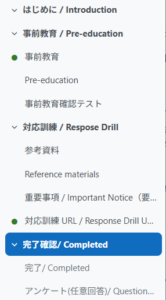
訓練を最後まで実施すると、Moodleの左側メニューに「完了確認 / Completed」というタブが表示されます。
こちらのページが表示されていれば、訓練は完了しています。
2. Confirming on Moodle
After completing the entire training, a tab labeled “Completed” will appear in the left-hand menu on Moodle.
If this page is displayed, the training is complete.
私はインシデント対応訓練を完了しましたが、その後訓練が未実施で訓練をするよう督促の連絡がありました。なぜ未実施の連絡があったのでしょうか?
I completed the incident response drill, but I received a message saying I haven't done the training yet. Why did I get this message?
我々はあるタイミングで訓練の未実施者を抽出し、その抽出したデータを基に、未実施者への連絡を行っています。
未実施者の抽出を行った後、未実施者への連絡を行うまで時間がかかる場合があります。
そのため未実施者の抽出を行った後連絡を行うまでの間に、インシデント対応訓練を実施された場合は、入れ違いで未実施である旨の連絡を行う場合があります。
We extract the list of people who haven't done the drill at a certain time and send messages based on that data. There might be a delay between extracting the list and sending the messages. So, if you did the drill after we extracted the list, you might still get a message saying you haven't done it.
「もみじ」にインシデント対応訓練を未実施の場合は実施するように周知する文面が掲示されていました。私は既にインシデント対応訓練を実施しましたが、なぜ「もみじ」に訓練を促す文面が掲示されているのでしょうか?
There was a notice on Momiji saying to do the incident response drill if you haven't done it yet. I already did the training. Why is there a notice on Momiji?
「もみじ」には、各個人のインシデント対応訓練の実施の有無に関わらず、学生の皆さん全体への周知として、訓練を促す文面を掲示しています。
The notice on "Momiji" is for all students, regardless of whether they have done the drill or not. It is to remind everyone to do the drill.
訓練対象者について/About Training Participants
私はインシデント対応訓練の対象者でしょうか?
Am I required to do the incident response drill?
既に掲示していますが、以下の方が対象者となりインシデント対応訓練を実施頂く必要があります。
- 役員及び教職員(非常勤職員,休職の者を除く)
- 学生(非正規生,休学,留学の者を除く)
As already posted, the following people need to do the training:
- Executives and staff members (excluding part-time staff and those on leave)
- Students (excluding non-regular students, those on leave, and those studying abroad)
インシデント対応訓練において【非常勤職員】は訓練対象者ではないと聞いています。私は非常勤職員のはずですが、先ほど訓練が未実施であるとの連絡がありましたが、なぜでしょうか?
I heard that 【part-time】 staff are exempt from the Incident Response Drill. I believe I am a part-time staff member, but I just received a notification that I have not completed the drill. Why is this?
インシデント対応訓練では以下の広島大学の"職員の定義"において、"非常勤職員"に該当する方を訓練対象外者としております。ご自身の職種が"契約職員"等に該当していないか、今一度ご確認頂くようお願いします。
職員の定義
※ 詳細はこちら(広島大学非常勤職員の任免・給与及び労働時間・休日・休暇に関する規則(第3条))をご参照ください。
For the Incident Response Drill, those who fall under the category of "Part-time Staff" (Hijokin Shokuin) according to Hiroshima University’s "Definition of Staff" (listed below) are indeed exempt. Please double-check your employment status to ensure that you are not classified as "Contract Staff" (Keiyaku Shokuin) or a similar category.
Definition of Staff:
※ For details, please refer here (Hiroshima University Regulations Concerning the Appointment, Dismissal, Salary, Working Hours, Holidays, and Leave of Non-Regular Staff [Article 3]).
相談フォーム/Consultation Form
上記記載の内容で解決しない場合は 質問の送信 から問い合わせください。
If the above does not solve your problem, please contact us from “Submit Question”.